
Budget Spreadsheet template: the only Personal Finance Tracker you need
Let me be real with you for a second. Most people who feel out of control with their money aren’t irresponsible. They just don’t have a system.
And here’s the thing: a system doesn’t have to be complicated. It doesn’t have to take hours to set up or require a finance degree to understand. It just has to work.
That’s exactly what the Planner Love Club Budget Spreadsheet Template was built for. This is the personal finance tracker that has already helped thousands of people finally see where their money is going, stop the end-of-month mystery, and actually start moving toward their financial goals.
And yes, it works in both Google Sheets and Excel. No formulas needed. No complicated setup. Just download, make a copy, and start.
👉 Get the Budget Spreadsheet Template now
Why most people struggle with their finances
It’s not about income. It’s not about effort. It’s about visibility.
When you don’t track your money, you’re basically driving with your eyes closed. You have a general sense of what’s happening, but no real picture. And without a real picture, you can’t make real decisions.
The moment you start actually seeing your numbers, everything changes. You spot the subscriptions you forgot about. You realize where you’re overspending without even noticing. You finally have something concrete to work with.
That’s what this spreadsheet does. It gives you your numbers back.
What makes this spreadsheet different?
There are plenty of free spreadsheet templates out there. So why does this one stand out?
Because it was built by someone who actually uses it. Every tab, every category, every chart was designed with real life in mind, not a theoretical budget that looks perfect on paper but falls apart by week two.
It’s beautiful, functional, and genuinely easy to use. No finance background required. No formulas to touch. No setup headaches. You open it, make a copy, and you’re ready to go.
And it does something most free templates don’t: it tracks your investments too.
Everything inside the Planner Love Club Budget Spreadsheet Template
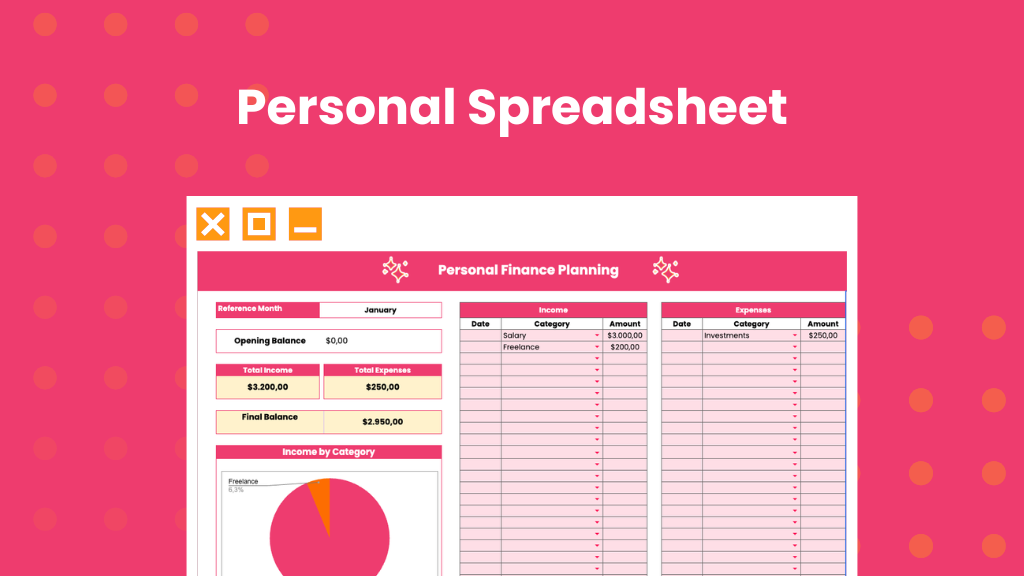
Here’s exactly what you get when you open this spreadsheet:
Home Dashboard
The first thing you see is your command center. At a glance, you can see:
- Your annual revenue and whether you’re on track with your goal
- Your total annual investment and how close you are to your investment target
- Quick navigation to jump to any month or section instantly
No scrolling, no hunting. Everything you need is right there.
Categories Tab
This is where you set up your personal finance system. You’ll find pre-filled income and expense categories like Salary, Rent, Food, and Investments already set up for you. Keep them, edit them, or add your own.
Whatever categories you create here will automatically appear as dropdown options in every monthly tab. One setup, used all year.
12 Monthly Tabs (January Through December)
Each month gets its own dedicated tab where you track:
- Opening balance for the month
- Every income entry with date, category, and amount
- Every expense entry with date, category, and amount
- Total income, total expenses, and final balance calculated automatically
- Income by category chart so you can see exactly where your money came from
- Expenses by category chart so you can see exactly where it went
No formulas to enter. No math to do. Just fill in your numbers and the spreadsheet does the rest.
Investment Dashboard
This is the feature that makes this spreadsheet genuinely special.
The investment tab lets you:
- Track your current balance across different accounts or banks
- Set a year-end investment goal
- Log your monthly investment amounts and compare them against your monthly goal
- See your percentage achieved at any point in the year
- Track your monthly returns
- Know exactly how much you still need to invest to hit your annual goal
If you have any savings or investment goals for this year, this tab alone is worth it.
How to use it, step by step
Step 1: Make a Copy
After downloading, open the file in Google Sheets and click File > Make a Copy. This saves your personal version to your Google Drive. Important: do not edit the light yellow cells, as those contain the formulas that make everything work automatically.
Step 2: Set Up Your Categories
Head to the Categories tab and fill in your income and expense types. You’ll see some already there. Keep what fits, delete what doesn’t, and add anything that’s missing from your life.
Step 3: Set Your Goals
On the Home tab, fill in your annual revenue goal and your annual investment goal. This gives you a target to work toward all year and lets the dashboard track your progress automatically.
Step 4: Start Tracking Monthly
Go to the tab for the current month. Enter your opening balance, then log every income and expense as they happen. Date, category, amount. That’s it.
You don’t have to log every single day. A weekly check-in where you sit down for 10 minutes and enter everything from the past few days is more than enough.
Step 5: Review Your Charts
At the end of each month, look at your charts. Where did your money come from? Where did it go? Does that match your priorities?
This is where the clarity happens. This is where you see the patterns, spot the opportunities, and make smarter decisions for next month.
Step 6: Check Your Investment Progress
Head to the Investments tab and update your monthly investment amount. See where you stand against your annual goal. Adjust if needed.
Why you deed this right now
If any of these sounds familiar, this spreadsheet was made for you:
- You never really know how much money you have until you check your bank account
- You get to the end of the month and genuinely can’t figure out where your money went
- You have financial goals but no real system to track whether you’re moving toward them
- You’ve tried budgeting apps but hate giving them access to your bank account
- You want something simple, beautiful, and actually usable in real life
This is the system you’ve been looking for.
It works in Google Sheets and Microsoft Excel. It requires zero formula knowledge. It takes about 10 minutes a week to maintain. And it gives you a complete picture of your finances, every single month, all year long.
Get the Budget Spreadsheet Template
Stop wondering where your money went. Start knowing.
👉 Get the Budget Spreadsheet Template here and take control of your finances today. 🩷
⚠️ Copyright Notice: All content on Planner Love Club is original and protected under U.S. copyright law, including the DMCA. Reproduction, redistribution, or commercial use of any content from this site, in whole or in part, is strictly prohibited. All rights reserved.